The Workstation Player of VMWare is a lightweight and free desktop virtualization hypervisor for non-commercial users. We can learn about virtualization and use it for practicing for free. We can run Windows, Linux and BSD systems on our host machine. The Workstation Player supports Windows and Linux as host for virtualization.
The free solution comes with some limitations. The following technique will let us to take backups or snapshots of our virtual machines. Only use it for personal practice and learning! Business and nonprofit use is considered commercial use!
If we don’t want to start the configuration of a machine over and over again, or we want to try out something that can cause system crash, then we want to take a backup of the VM.
In VMWare Workstation Player we have to figure out where are the files of the virtual machine on the disk to be able to create a copy of them.
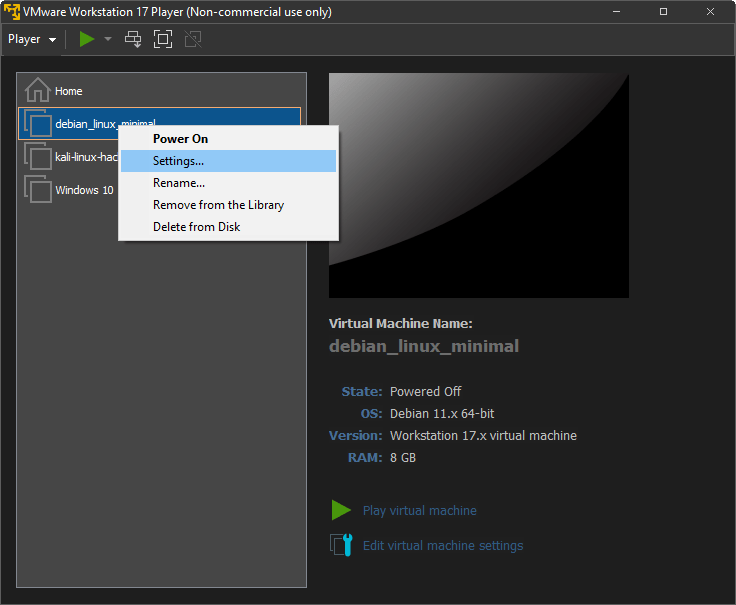
Let’s open the application, right click on the machine and choose the Settings menu!
Navigate to the Options tab and check the Working directory option!
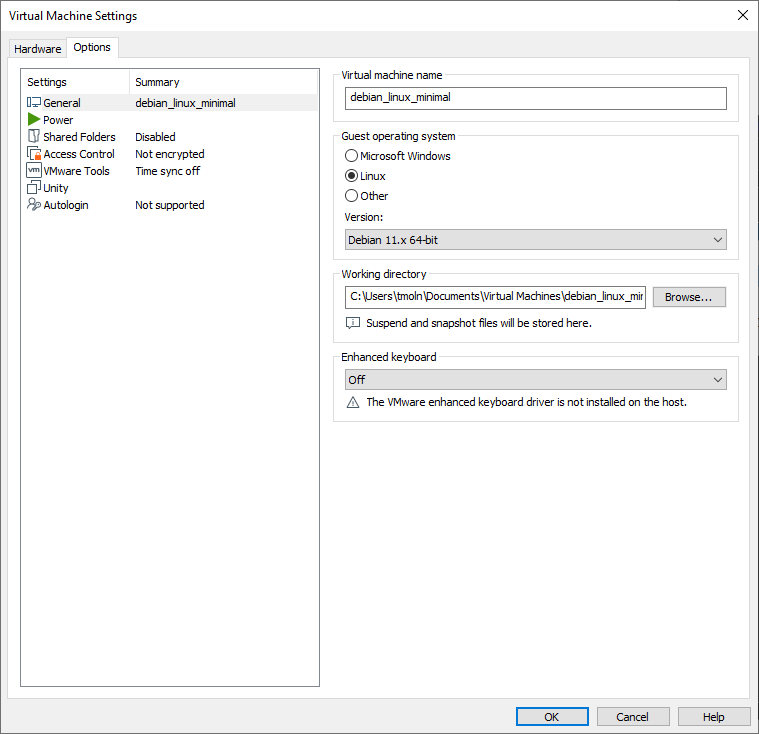
Take a note of the path!
Make sure that the VM is stopped.
Now we can copy the whole directory of the VM, and use it as a backup/snapshot anytime we want to re-import it!
If you have anything to share then please visit my Tom’s IT Cafe Discord Server!
 Tom's IT Cafe