Nessus is a popular and widely used vulnerability assessment tool that works for both web and mobile applications and can be deployed on-premises or in a cloud environment. It scans and detects malware of embedded devices, configurations auditing, compliance checks among many other functions.
Small companies face a growing risk of cyber attacks in the digital age, as they often lack the resources and expertise to secure their networks and data. One way to improve their security is to perform regular security checks using a vulnerability scanner. Tenable Nessus Essentials is a powerful tool that can help small companies scan their systems for vulnerabilities and remediate them before they are exploited.

Don’t forget to join my Discord: https://discord.gg/YbSYGsQYES
Nessus can be used to scan and audit the following environments:
- Virtualization: For VMware ESX, ESXi, Hyper-V, vSphere, vCenter, and Citrix Xen Server
- Operating systems: such as Mac, Windows, Linux, BSD, Cisco iOS, Solaris, IBM iSeries.
- Cloud: It can be used to scan cloud applications and instances like Salesforce and AWS
- Databases: Oracle, SQL Server, MySQL, DB2, Informix/DRDA, PostgreSQL, MongoDB.
- Network devices: firewalls/routers/switches (Juniper, Check Point, Cisco, Palo Alto Networks), printers, storage.
- Web applications: Web servers, web services, OWASP vulnerabilities
Some of the features of Nessus include:
- High-speed asset discovery
- Sensitive data discovery
- Smart service recognition
- Target profiling
- Malware detection
- Configuration auditing
- Scalable: It quickly exploits the systems strengths so it can increase its scanning efficiency.
- Offers multiple services
- Full SSL support
- The biggest user base
- Up-to-date security vulnerability database
- Proven maturity: with the first public release of Nessus in 1998. Ever since the technology behind it has been extensively tested and perfected on huge networks over time .
In this guide, I will go through how to install Nessus Vulnerability Scanner on Debian Linux system.
Step 1: Download and Install Nessus
You need the curl package to download the installer package.
apt install curl
Then, you have to download the .deb package for installation on Debian from the official Nessus downloads page.
curl --request GET \
  --url 'https://www.tenable.com/downloads/api/v2/pages/nessus/files/Nessus-10.5.3-debian10_amd64.deb' \
  --output 'Nessus-10.5.3-debian10_amd64.deb'
Once you have downloaded the package, navigate to the downloads directory and install Nessus with the command below:
apt install -f ./Nessus-10.5.3-debian10_amd64.deb
This will update your system packages and install Nessus on your Debian system.
In the end of the installation process you will see a similar output:
INSTALL PASSED
Unpacking Nessus Scanner Core Components...
Created symlink /etc/systemd/system/multi-user.target.wants/nessusd.service → /lib/systemd/system/nessusd.service.

 - You can start Nessus Scanner by typing /bin/systemctl start nessusd.service
 - Then go to https://nessus:8834/ to configure your scanner
Step 2: Start and enable the Nessus service
After installing Nessus, you need to start the Nessus service . This will ensure that the service is running and will start automatically when your system boots up.
systemctl start nessusd.service
It will start the Nessus service and make the web interface available.
Step 3: Configure Nessus Vulnerability Scanner
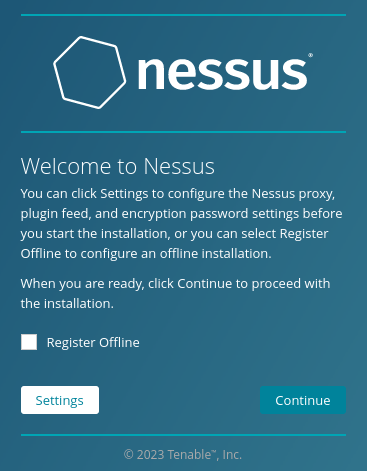
Once the service is started, you can configure Nessus Vulnerability Scanner. This involves setting up your account and configuring various settings to suit your needs.
If you already have an Essentials account and license, then follow this process!
Click to Continue:
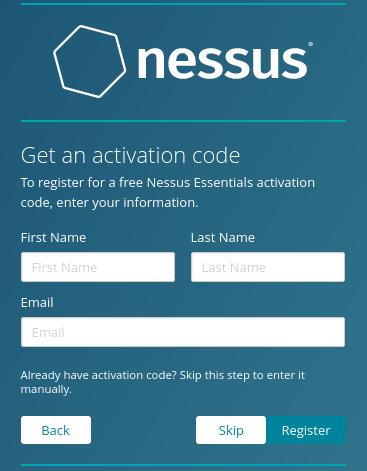
Let’s register for Nessus Essentials:

You can skip the registration if you already have a license key:
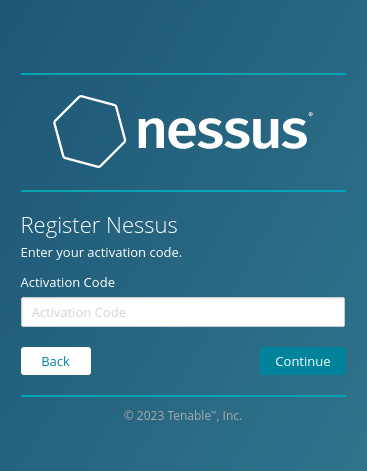
Now you have to paste your activation code here:
Then an administrator account is created:
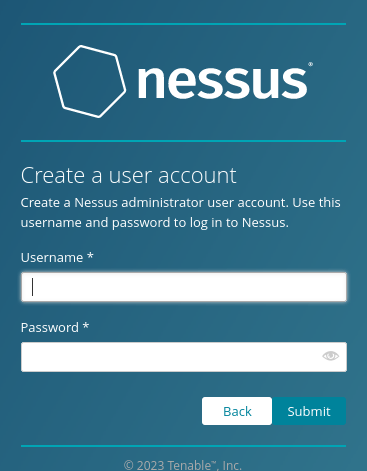
The initial Nessus setup is ready.
At this point the Nessus service will start compiling the necessary modules and extensions. It can take 5-10 minutes depending on the host system.
After the compilation, Nessus is ready to start scanning.
Step 4: Use Nessus Vulnerability Scanner
After completing the configuration, you can start using Nessus Vulnerability Scanner . This involves running scans on your target systems to identify vulnerabilities and potential security risks.
That’s it! You have successfully installed Nessus on Debian Bookworm.
Don’t forget to join my Discord: https://discord.gg/YbSYGsQYES
Discover more from Tom's IT Cafe
Subscribe to get the latest posts sent to your email.
 Tom's IT Cafe
hey
cool blog 🙂 will give it a follow and a like !
LikeLike
Thank you very much!
LikeLike